Navigating Your Creative Projects: The Role and Considerations of a Project Tracker
Managing a creative endeavor, especially one intended for publication or sale, often involves juggling multiple moving parts. From initial concept to final upload, the process can become fragmented, leading to missed deadlines, overlooked tasks, and a general sense of disorganization. This is where the concept of a Project Tracker becomes invaluable. For creators, authors, and designers, a Project Tracker is not simply a checklist; it’s a dedicated framework for overseeing the entire lifecycle of a project. Its primary distinction lies in consolidating all critical information—milestones, file formats, specifications, and status updates—into a single, manageable overview. Unlike a generic to-do list, a Project Tracker is tailored to the specific phases of content creation, such as preparing digital products for platforms like Amazon KDP.
Understanding the Core Function of a Project Tracker
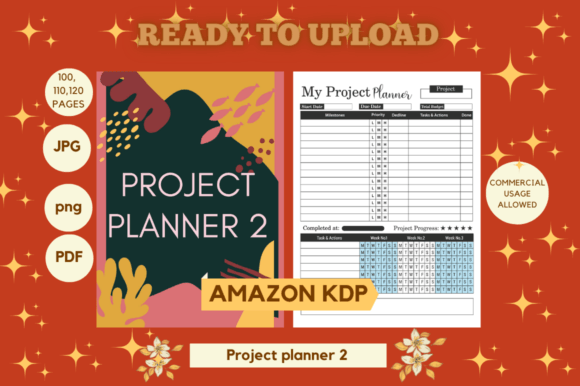
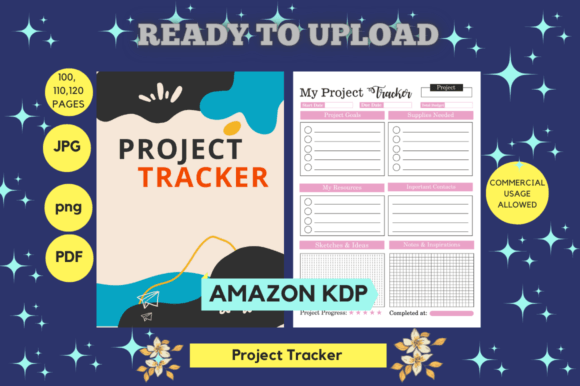
A Project Tracker serves as a centralized command center for your project. In practical terms, it might be a digital spreadsheet, a specialized software dashboard, or even a meticulously designed physical planner. Its purpose is to provide clarity. For example, consider a project involving the creation of six distinct PDF workbooks, each with specific dimensions like 8.5" x 11", varying page counts (100, 110, 120), and requirements like "No Bleed" and "Print Ready." A Project Tracker would allow you to monitor the completion status of each book individually, ensure all required file formats (PDF, PPT, PNG, JPG) are prepared, and verify that each element has been tested on the target platform. This holistic view prevents the common pitfall of focusing on one aspect, such as design, while forgetting another, such as final formatting checks.
The Trade-off Between Structure and Flexibility
One key consideration when evaluating a Project Tracker is the balance between prescribed structure and adaptable flexibility. Some trackers are highly detailed with predefined categories for every conceivable task. This can be excellent for complex, multi-stage projects with fixed specifications, ensuring nothing is omitted. However, it might feel restrictive for simpler projects or for creators who prefer a more organic workflow. Conversely, a minimalist tracker offers broad categories you define yourself, providing greater freedom but potentially less guidance. The best-fit situation often depends on your experience level and the project's complexity. A novice preparing their first KDP upload might benefit from the comprehensive structure of a detailed tracker, while a seasoned creator might prefer a lightweight tool they can customize swiftly.
Comparing Project Trackers to Adjacent Organizational Tools
It's useful to understand how a Project Tracker compares to other common organizational methods. A simple task management app excels at daily to-do items but often lacks the high-level, project-specific overview needed for a publishing workflow. It might remind you to "edit Chapter 3" but wouldn't inherently track that chapter's integration into a final, print-ready PDF with specific dimensions. Digital calendars are superb for scheduling deadlines but are not designed to store static project specifications like page counts or file format requirements. The Project Tracker fills this gap by integrating both the temporal schedule and the permanent project data. It becomes the reference document that answers questions like "What are the exact dimensions for Book #4?" or "Have I generated the PNG versions for all covers?"
When a Project Tracker is the Right Choice
A Project Tracker is likely the right choice when your project has multiple deliverables with precise technical requirements. The example of preparing six KDP workbooks is a perfect illustration. Each book is a separate deliverable, yet they share common attributes (dimensions, no bleed) and unique ones (page count). A tracker helps manage this parallelism efficiently. It’s also beneficial when you are collaborating with others, as it provides a clear, shared source of truth on project status and specs. Furthermore, if you tend to manage several such projects concurrently, a tracker for each one prevents mental overload and context-switching errors.
Scenarios Where Another Option Might Be More Suitable
While powerful, a Project Tracker isn't a universal solution. For very small, linear projects—perhaps creating a single, simple document—the overhead of setting up and maintaining a tracker might outweigh its benefits. A basic checklist could suffice. Similarly, if your creative process is intensely intuitive and non-linear, a rigid tracking framework might feel disruptive. In such cases, alternative approaches like mind-mapping tools or free-form journaling might better support your ideation phase, with a tracker perhaps adopted only for the final, technical execution stages. The decision factor here is the alignment between the tool's structure and your personal workflow methodology.
Evaluating the Strengths and Potential Limitations
The primary strength of a dedicated Project Tracker is risk mitigation. By providing visibility, it directly reduces the chance of errors like uploading an incorrect file format or forgetting to apply a critical test. It turns implicit knowledge into explicit records. A potential limitation, however, is that a tracker is a reflective tool; it records and organizes decisions but does not make them for you. It won't solve creative blocks or design issues. Its value is entirely dependent on your commitment to update it consistently. An outdated tracker is worse than having none at all, as it provides misleading information. Therefore, its utility is tied to a habit of regular review and update.
Key Decision Factors for Implementing a Project Tracker
If you are considering adopting a Project Tracker, a few practical factors can guide your choice. First, assess the project's scope: the number of deliverables, the complexity of specifications, and the number of steps from start to finish. Second, consider your access and preference: do you need a mobile-friendly digital tool, or does a printed sheet on your desk work better? Third, think about integration: can your tracker easily incorporate the actual files (like links to the final PDFs) or is it purely for metadata? For instance, a digital tracker that allows you to attach the "Ready to upload PDF" files for each book creates a powerful central hub. Finally, evaluate its longevity: will this tracker serve as a template for future, similar projects, saving you setup time next time?
In the context of preparing digital products, the Project Tracker's role in quality assurance is critical. The note that a project has been "Tested On KDP" is a vital milestone. A tracker ensures this step isn't assumed but is logged as completed for each variant (e.g., for each of the 06 books). This formalizes quality control, making the process reproducible and reliable.
Moving Forward with Informed Management
Ultimately, the goal of any organizational tool is to free you to focus on the creative work itself. A well-implemented Project Tracker does this by offloading the burden of memory and coordination onto a reliable system. It turns a potentially anxiety-inducing jumble of tasks and specs—like managing multiple interior files, graphics, and formats—into a sequenced, clear plan. Whether you choose a sophisticated digital solution or a simple, self-designed template, the core principle is the same: visibility leads to control. By comparing this approach to your current methods and honestly assessing your project's needs, you can make an informed decision on whether a Project Tracker will be a helpful companion for your next creative journey.