Master Your Digital Keys: The Password Tracker Canva Template Solution
Managing passwords has become one of the universal frustrations of modern life. Between work, personal accounts, subscriptions, and online tools, the list of login credentials seems endless. Many people resort to risky shortcuts—reusing the same password, using easy-to-crack phrases, or saving everything in an unprotected note on their phone. This is where a structured, visual system can make a profound difference. The Password Tracker Canva Template provides exactly that: a designed, printable framework to organize, record, and secure your digital access points in one central, physical location.
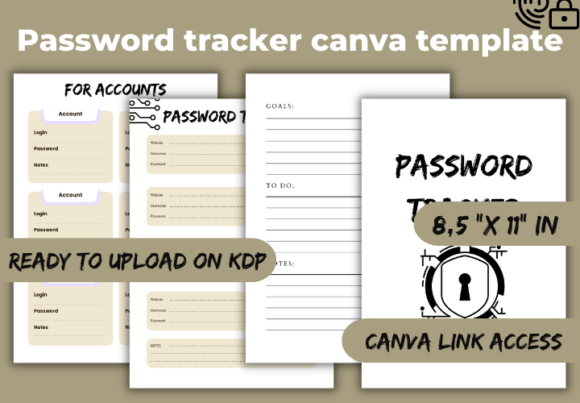
It’s more than just a blank sheet; it’s a pre-formatted guide that prompts you to record essential details like the website, username, password, security notes, and update dates. For many adults juggling multiple roles—from professionals handling client portals to parents managing family streaming accounts—this template offers a simple yet effective bridge between digital chaos and physical order. By having a high-quality PDF file ready for upload or print, you gain a tangible asset for your personal security infrastructure.
Overlooked Details When Choosing a Password Management Tool
A common misunderstanding is that all password helpers are inherently digital. People immediately think of app-based password managers, which are excellent for certain uses. However, this overlooks the significant advantages of a physical, off-line system like a well-designed Password Tracker Canva Template. Digital managers require you to trust a third-party service, remember a master password, and navigate sometimes complex interfaces. A printed tracker exists entirely under your control, with no subscription fees or internet dependency. It’s a straightforward complement, not a competitor, to digital security.
Another overlooked detail is the importance of design and usability. A poorly laid-out list on a scrap of paper quickly becomes messy and unusable. The template’s structured layout, created in Canva, ensures clarity. Each entry has a dedicated space, reducing the chance you’ll cram information illegibly or omit crucial update dates. This attention to visual organization directly affects long-term efficiency. A messy list is abandoned; a clear, professional-looking sheet is maintained.
Common Mistakes in Using a Password Tracker
Even with a great template, users can fall into practical pitfalls. The most frequent mistake is not placing the tracker in a secure, consistent location. Printing your password tracker PDF and leaving it on a desk or open notebook defeats its purpose. The physical security of the document is paramount. It should be stored in a locked drawer or a private filing system, treated with the same care as a passport or financial document.
A related error is incomplete or vague entries. The template provides fields, but users might only fill in the password itself. For example, writing “P@ssw0rd2024” without noting which specific email address or username it pairs with creates confusion later. A better approach is to use each field diligently:
- Website/App: "Adobe Creative Cloud Subscription"
- Username: "work.email@example.com"
- Password: (Your recorded password)
- Notes: "Updated quarterly, recovery phone number set."
- Last Updated: "03/15/2024"
This level of detail turns a simple list into a true management system.
The Pitfall of Static Thinking
Many treat a password log as a one-time filling exercise. This is a critical misunderstanding. Passwords should be changed periodically, especially for high-value accounts like email, banking, or main social profiles. If your tracker doesn’t have a "Last Updated" field or you ignore it, you lose track of which passwords are stale and potentially vulnerable. The Password Tracker Canva Template inherently encourages dynamic use by including such fields, but you must commit to reviewing and updating it regularly, perhaps aligning with a monthly or quarterly personal admin check.
What to Check Before Using Your Template
Before you even download the PDF file and start editing in Canva, consider your broader security posture. Are you using strong, unique passwords for each entry? A tracker facilitates organization, but it doesn’t generate security. Combine using this template with a commitment to password best practices: longer phrases, mixing characters, and avoiding personal information. The tracker then becomes the reliable record for these strong credentials.
Also, verify the flexibility of the Canva link provided with the product. A high-quality template should allow you to customize within reason—perhaps adding a column for account type (Personal, Work, Financial) or changing header colors for visual categorization—without breaking the core layout. This ensures the tool adapts to your specific needs. If the template is rigid and uneditable, it may not suit evolving requirements.
A Balanced Approach to Digital Security
Using the Password Tracker Canva Template is not about rejecting technology; it's about creating a hybrid system that balances convenience with security. For sensitive accounts you access infrequently, or for backup recovery information, a physical copy stored securely is incredibly valuable. It serves as a fail-safe, immune to digital hacking or cloud service outages.
For daily-use accounts, you might still use browser autofill or a digital manager. The tracker then acts as your master reference and change-log. This layered approach, utilizing both digital convenience and physical backup, is a mature strategy often missed by those seeking a single, perfect solution. The template’s 8.5" x 11" inch PDF format makes it easy to print at home or a local shop, fitting standard binders or filing systems for integrated organization.
Finally, remember that the act of manually writing or typing your passwords into a structured format creates a moment of conscious review. You’re more likely to notice a weak password or a redundant one when you’re entering it into a designated field than when you’re letting a digital manager capture it automatically. This mindfulness is an intangible yet powerful benefit. The Password Tracker Canva Template, therefore, is more than a product; it’s a catalyst for adopting a more attentive and proactive role in your own digital safety.