Streamlining Customer Orders with a Simple Business Order Tracker
For entrepreneurs managing direct sales, whether you run an online craft store, a local bakery, or a consultancy offering physical deliverables, the flow of customer orders is the central heartbeat of your operation. Keeping track of what was ordered, by whom, its current stage of production, and its shipping status can quickly become a complex administrative task. Many small business owners default to digital solutions, which are excellent, but sometimes a tangible, physical system offers a clarity and focus that screens cannot. This is where a dedicated Business Order Tracker sheet proves its value.
The Core Function of a Physical Order Tracking Page
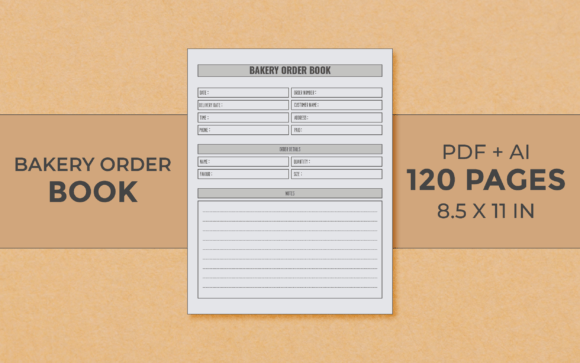
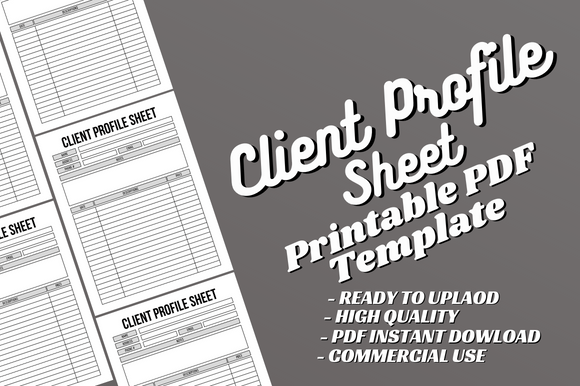
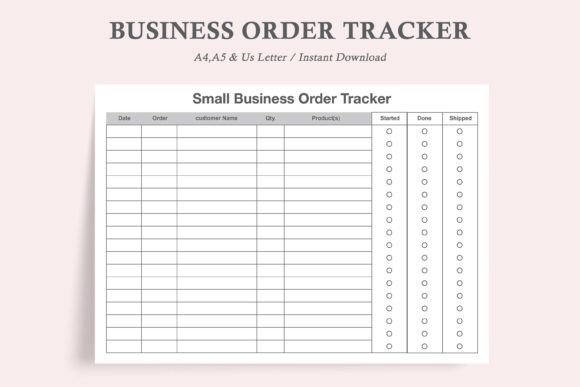
A Business Order Tracker is fundamentally a designed form, a single-page document that provides a structured layout to log every essential detail of a customer order. Its purpose is to create a consistent record for each transaction, moving that information from informal notes, scattered emails, or mental reminders into a standardized format. The key columns typically include spaces for the customer's name and contact details, the order date, a description of the items or services ordered, any special notes, and crucially, the order status.
The defining feature of many effective trackers, including the one described here, is a visual progress indicator. A column of circles, or similar symbols, labeled for different stages—like “Starting Work,” “Completing Order,” and “Shipping Order”—allows you to manually mark completion. Filling in a circle provides an immediate, at-a-glance view of where every order stands. This tactile action can also create a psychological sense of progress and accomplishment, a small but meaningful boost during a busy workday.
Design Considerations for Practical Use
The utility of any such tool is deeply tied to its design philosophy. A Business Order Tracker that is “clean and simple” and “ink-friendly” addresses several real-world concerns for a small business. Firstly, it respects operational costs. Minimalist designs with limited heavy graphics or solid color blocks consume less printer ink or toner, allowing you to print numerous sheets without worrying about resource expenditure. This is a practical nod to frugality.
Secondly, a simple layout enhances usability. Uncluttered fields with clear labels reduce cognitive load. You aren’t deciphering a complex form; you are quickly filling in necessary data. The inclusion of pre-marked space for three-hole-punch binder placement is another thoughtful feature. It transforms individual sheets into a cohesive, organized system. You can archive completed orders chronologically or by client, creating a physical backup record that is easily accessible.
Evaluating Key Features and Format Flexibility
A robust Business Order Tracker offering typically includes multiple file formats and sizes. The provision of three PDF sizes—US Letter, A4, and A5—alongside JPEG versions, speaks to flexibility. US Letter is standard in North America, A4 is international standard, and A5 is a handy half-size. This means the tool adapts to your regional paper stock and personal preference. Perhaps you want a full-page sheet for detailed orders, or an A5 half-sheet for simpler, quicker projects. Having the choice is valuable.
The “Digital Editable” aspect is significant. While the core value is as a printable sheet, an editable digital PDF allows for potential customization before printing. You might add your company name to the header, or adjust a column label to better suit your specific terminology before committing to a print run. This bridges the gap between a static form and a slightly personalized tool.
The instruction to “print as many sheets as you need, or a new sheet every time you need one” underscores its role as a consumable operational document. It is not a perpetual chart; it is a dedicated log for each order. This one-to-one correspondence ensures focus and avoids the clutter of trying to track multiple orders on a single, overcrowded page.
Strengths in Real-World Application
In daily use, such a Business Order Tracker performs several functions simultaneously. It acts as a unified intake form when an order is received, compelling you to capture all relevant details immediately. It then serves as a workflow dashboard on your desk or in your binder, visually signaling which tasks are pending. Finally, it becomes an archived record for customer service, allowing you to look back on order specifics without searching through digital files.
For sole proprietors or very small teams without dedicated project management software, this system introduces much-needed discipline. It reduces the risk of forgetting a custom request or missing a shipping deadline because the order status was unclear. The physical presence of the sheet can also serve as a direct workspace companion—you can jot additional notes on it during the production process, making it a living document.
Identifying the Ideal User and Workflow Fit
The Business Order Tracker is not for every business. It is particularly well-suited for entrepreneurs whose business involves discrete, individual customer orders with a tangible output. Think of artisans, small-scale manufacturers, caterers, freelance designers producing physical products, or anyone who manages a direct-to-consumer sales queue. Its benefits are most pronounced in workflows that are already partially physical—where you are hands-on creating items—and where a quick visual reference is more efficient than opening a software app.
It also complements digital systems rather than necessarily replacing them. You might enter orders into an accounting software for invoicing, but use the printed Business Order Tracker as your workshop or production floor guide. This hybrid approach can streamline processes. Conversely, for businesses dealing entirely with digital deliverables or ongoing service contracts with no clear “order” milestones, this tool may be less applicable.
Professional Observations on Long-Term Value
The long-term value of implementing a simple tool like this lies in consistency and scalability. Starting with a disciplined tracking method, even on paper, builds good operational habits. As your order volume grows, having a standardized archive in a binder facilitates reviewing past patterns, understanding peak periods, or resolving customer queries. The low cost and simplicity mean there is almost no barrier to adoption; you can integrate it tomorrow and test its effectiveness in your own environment.
A possible limitation, of course, is its physical nature. It requires manual updating and does not offer automated reminders or shared access for a team. If your workflow is remote or highly collaborative across different locations, a digital project management tool would be more appropriate. However, for the solo entrepreneur working from a dedicated studio, home office, or workshop, the tactile, focused nature of a printed Business Order Tracker can be a surprisingly effective anchor for daily operations.
Ultimately, the worth of a Business Order Tracker is measured by its ability to reduce administrative friction and provide clear visibility into your work pipeline. Its minimalist design, format options, and binder-friendly construction are all features crafted around real small-business needs. By offering a dedicated space to log, track, and archive each customer order, it helps transform a stream of requests into a managed, orderly process, freeing you to focus more energy on the actual work of creation and service.